

By Admin @June, 18 2025
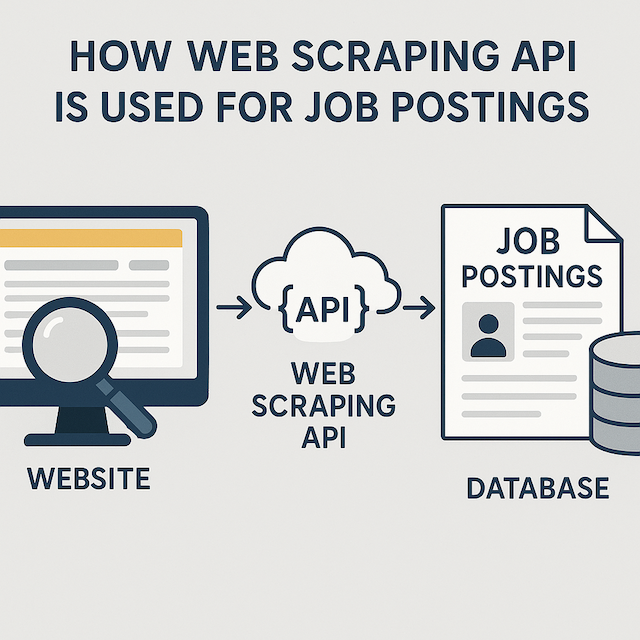
How Web Scraping API Is Used For Job Postings
In October 2023, the United States had more than 8.7 million job openings, a decrease from the previous months when there were over a million more openings. The rapid fluctuation highlights the dynamic nature of the job market, where both employers and job seekers must stay agile to seize opportunities.
In such a fast-paced environment, staying updated with potential job opportunities is crucial. However, the job market data constantly changes, making it challenging to keep track of relevant information. That is where job scraping comes into play as a valuable method for gathering job data efficiently.
Web scraping APIs provide a powerful solution for extracting job posting data from various websites efficiently. In this guide to scraping job posting data, we will delve into the process of scraping job postings, its functionality, the advantages it offers, and how you can leverage it to your advantage.
Web scraping is the process of extracting data from websites. It involves fetching and parsing HTML content to extract the desired information. Web scraping APIs make this process easier by providing pre-built tools and functions to interact with websites and extract data programmatically.
Job scraping involves using automated tools to gather job listings from various online sources such as websites, job boards, and company career pages. These tools efficiently collect essential information like job titles, descriptions, company names, locations, and more.
Web scraping APIs for job postings enable you to access websites programmatically, fetch HTML content, parse it to extract relevant data like job titles and descriptions, and then structure the data for further processing. These APIs automate the data extraction process, making it efficient and scalable for extracting job posting information.
Web scraping APIs enable you to access job posting websites programmatically. You can send HTTP requests to the website's server and receive HTML responses containing the job posting data.
Once the HTML content is retrieved, web scraping APIs parse the content to extract relevant information such as job titles, descriptions, locations, and application deadlines. The parsing process involves identifying specific HTML elements and their attributes that contain the desired data.
After parsing the HTML content, web scraping APIs extract the desired data from the identified HTML elements. The data is then structured and formatted for further processing or analysis.
The following are the benefits of using web scraping APIs for job postings:
Here's how to get started with web scraping for job postings:
There are several web scraping APIs available, each with its own features and pricing plans. Some popular options include BeautifulSoup, Scrapy, and Selenium. Choose an API that best suits your project requirements.
We'll use BeautifulSoup, which is a powerful and user-friendly Python library for parsing HTML and XML documents. Its simplicity makes it an excellent option for beginners and projects with straightforward scraping needs.
You can install BeautifulSoup using pip, the Python package manager, by running the following command in your terminal or command prompt:
pip install beautifulsoup4
Create a new project directory and set up your development environment to start coding. You can do this using the mkdir command in your terminal or command prompt:
mkdir web_scraping_project
Write a Python script using BeautifulSoup to access job posting websites, parse HTML content, and extract relevant data. Use functions provided by the API to navigate through website pages and extract job posting details.
from bs4 import BeautifulSoup
import requests

# Function to scrape job posting data
def scrape_job_postings(url):
    # Send an HTTP GET request to the job posting website
    response = requests.get(url)

    # Check if the request was successful (status code 200)
    if response.status_code == 200:
        # Parse the HTML content of the response using BeautifulSoup
        soup = BeautifulSoup(response.text, 'HTML.parser')

        # Extract relevant job posting details
        job_postings = []

        # Example: Extract job titles
        job_titles = soup.find_all('h2', class_='job-title')
        for title in job_titles:
            job_postings.append({
                'Title': title.text.strip()
            })

        # Example: Extract job descriptions
        job_descriptions = soup.find_all('div', class_='job-description')
        for index, description in enumerate(job_descriptions):
            job_postings[index]['Description'] = description.text.strip()

        # Example: Extract job locations
        job_locations = soup.find_all('div', class_='job-location')
        for index, location in enumerate(job_locations):
            job_postings[index]['Location'] = location.text.strip()

        # Example: Extract application deadlines
        job_deadlines = soup.find_all('span', class_='application-deadline')
        for index, deadline in enumerate(job_deadlines):
            job_postings[index]['Application Deadline'] = deadline.text.strip()

        return job_postings
    else:
        # Print an error message if the request was unsuccessful
        print("Failed to access the job posting website")
        return None

# Main function
def main():
    # URL of the job posting website
    URL = "http://www.example.com/job-postings"

    # Scrape job posting data from the website
    job_postings = scrape_job_postings(url)

    # Print the scraped job posting data
    if job_postings:
        for index, job in enumerate(job_postings, start=1):
            print(f"Job {index}:")
            print(f"Title: {job['Title']}")
            print(f"Description: {job['Description']}")
            print(f"Location: {job['Location']}")
            print(f"Application Deadline: {job['Application Deadline']}")
            print()
    else:
        print("No job postings found")

if __name__ == "__main__":
    main()
Once you have extracted the job posting data, handle it according to your project needs. You can store the data in a local file, or database, or integrate it with other applications for further analysis.
# Python code snippet provided
Test your scraping script thoroughly to ensure it retrieves accurate and relevant job posting data. Refine your script as needed to improve its efficiency and reliability.
# Python code snippet provided
Web scraping APIs offer a powerful solution for accessing and extracting job posting data from various websites. By automating the data extraction process, these APIs save time, provide real-time updates, and offer customization options for tailored results.
RECENT POSTS
RELATED POSTS
CATEGORIES
follow us on



 Linkedin